'%3e%3cg%20id='logo-blue-svg'%20transform='translate(0.396%200.591)'%3e%3cpath%20d='M38.832,6.955l-5.266,10.5-4.2-8.315A15,15,0,0,0,15.063.753a15.311,15.311,0,0,0,.309,30.6V25.13a9.13,9.13,0,0,1-8.638-9.166A9.031,9.031,0,0,1,23.887,12l6.2,12.419,3.468,6.94,3.507-6.94L45.8,6.955Z'%20transform='translate(-0.51%20-0.73)'%20fill='%232babe2'/%3e%3cpath%20d='M30.434,208.54h1.59v7.421h-1.59v-.5a1.972,1.972,0,0,1-1.58.654,2.344,2.344,0,0,1-1.792-.811,3.034,3.034,0,0,1,0-3.976,2.344,2.344,0,0,1,1.792-.811,1.981,1.981,0,0,1,1.58.648Zm-2.173,5.715a1.362,1.362,0,0,0,1.824,0,1.446,1.446,0,0,0,0-1.888,1.366,1.366,0,0,0-1.824,0A1.446,1.446,0,0,0,28.261,214.255Z'%20transform='translate(-22.52%20-177.939)'%20fill='%232babe2'/%3e%3cpath%20d='M74.386,225.4a1.2,1.2,0,0,0,1.272.736,1.325,1.325,0,0,0,1.018-.4l1.272.736a2.661,2.661,0,0,1-2.312,1.1,2.9,2.9,0,0,1-2.137-.8,2.8,2.8,0,0,1,2.02-4.8,2.561,2.561,0,0,1,1.925.8,2.771,2.771,0,0,1,.768,2,3.106,3.106,0,0,1-.063.636Zm-.032-1.187h2.28a1.057,1.057,0,0,0-1.124-.838,1.076,1.076,0,0,0-1.157.838Z'%20transform='translate(-62.029%20-189.395)'%20fill='%232babe2'/%3e%3cpath%20d='M116.254,223.6c0,.106.09.193.271.261a6.7,6.7,0,0,0,.652.2,6.062,6.062,0,0,1,.763.261,1.555,1.555,0,0,1,.652.524,1.508,1.508,0,0,1,.269.917,1.475,1.475,0,0,1-.636,1.3,2.693,2.693,0,0,1-1.568.442,2.287,2.287,0,0,1-2.28-1.262l1.378-.785a.867.867,0,0,0,.9.627q.571,0,.573-.328c0-.106-.091-.194-.271-.265a5.784,5.784,0,0,0-.652-.206,5.583,5.583,0,0,1-.763-.265,1.63,1.63,0,0,1-.652-.516,1.365,1.365,0,0,1-.271-.859,1.52,1.52,0,0,1,.6-1.289,2.375,2.375,0,0,1,1.48-.456,2.483,2.483,0,0,1,1.2.294,2.237,2.237,0,0,1,.87.844l-1.358.736a.78.78,0,0,0-.71-.467Q116.254,223.3,116.254,223.6Z'%20transform='translate(-97.61%20-189.326)'%20fill='%232babe2'/%3e%3cpath%20d='M152.6,208.456a.952.952,0,1,1,.28-.674A.922.922,0,0,1,152.6,208.456Zm-1.472,6.047v-5.3h1.59v5.3Z'%20transform='translate(-128.819%20-176.481)'%20fill='%232babe2'/%3e%3cpath%20d='M174.941,222.048h1.548v5.036a2.26,2.26,0,0,1-.817,1.892,3.1,3.1,0,0,1-1.983.642,2.637,2.637,0,0,1-2.512-1.283l1.356-.785a1.444,1.444,0,0,0,2.092.374,1.091,1.091,0,0,0,.317-.844v-.487a1.871,1.871,0,0,1-1.548.689,2.459,2.459,0,0,1-1.861-.789,2.8,2.8,0,0,1,0-3.807,2.453,2.453,0,0,1,1.861-.791,1.871,1.871,0,0,1,1.548.689Zm-2.209,3.435a1.425,1.425,0,0,0,1.845,0,1.28,1.28,0,0,0,0-1.782,1.425,1.425,0,0,0-1.845,0,1.279,1.279,0,0,0,0,1.782Z'%20transform='translate(-145.714%20-189.327)'%20fill='%232babe2'/%3e%3cpath%20d='M222.341,221.927a1.9,1.9,0,0,1,1.416.589,2.246,2.246,0,0,1,.567,1.62v3.254h-1.586v-3.035a.944.944,0,0,0-.261-.716.914.914,0,0,0-.663-.249.952.952,0,0,0-.719.275,1.136,1.136,0,0,0-.265.817v2.893H219.24v-5.3h1.584v.5A1.765,1.765,0,0,1,222.341,221.927Z'%20transform='translate(-187.032%20-189.355)'%20fill='%232babe2'/%3e%3cpath%20d='M264.587,223.27a1.3,1.3,0,0,1,.6-.779,1.883,1.883,0,0,1,.991-.271v1.8a1.6,1.6,0,0,0-1.087.2,1.074,1.074,0,0,0-.5,1.013v2.4H263v-5.3h1.59Z'%20transform='translate(-224.348%20-189.604)'%20fill='%232babe2'/%3e%3c/g%3e%3c/g%3e%3c/svg%3e)
Find ideas
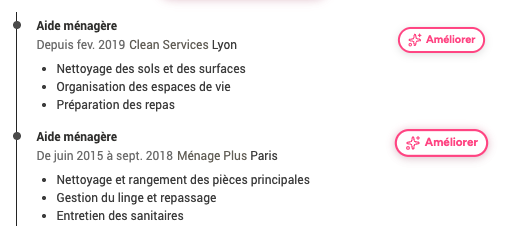
Identify responsibilities, skills or ways to present your experience that you may not have considered.
 ChatGPT
CVDesignR's recruitment AI gradually analyses the information in your profile, your background, your skills and your career goals to better understand the kinds of opportunities that may suit you.
The more complete and precise your profile is, the more relevant its recommendations can become. Your experience, target role, sector, skills and preferences help the AI refine its understanding and suggest opportunities that are more consistent with your plans.
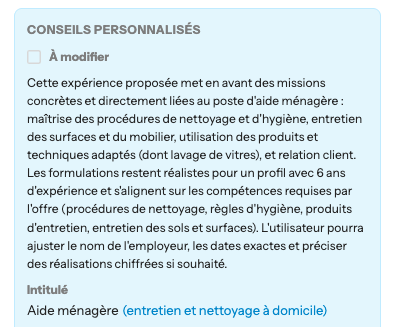
Recruiters are not looking for text that merely sounds professional. They want to understand what you have actually done and what you could bring to the role.
Every suggestion should therefore pass three checks: is it true? is it useful for this role? is it worded in a way I could explain aloud? If not, adjust it in a couple of clicks.
This personalisation step is also what prevents interchangeable CVs. Two people with the same job title do not have the same achievements, environment or strengths.
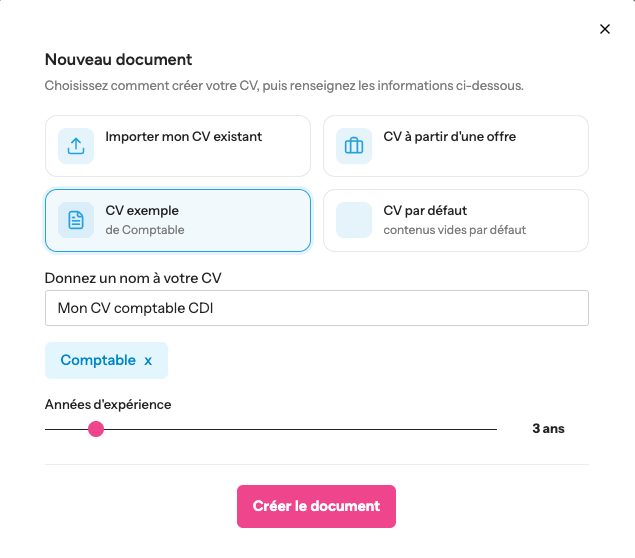
A job advert contains many clues: responsibilities, tools, level of autonomy, expected skills and industry vocabulary. AI can help you sort through this information.
Then compare the advert with your own experience. You can reorder your skills, expand certain responsibilities or rewrite your profile summary to make the connection with the role clearer.
However, avoid turning your CV into a copy of the advert. Keywords only have value when they genuinely match your background and appear in a credible context.
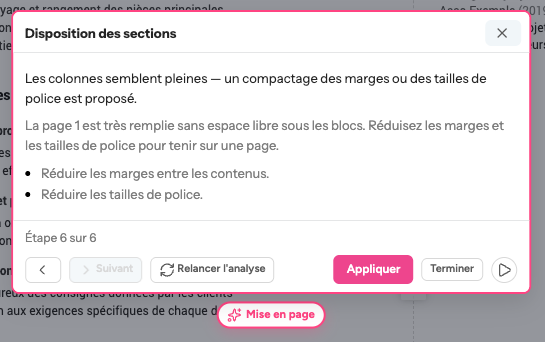
Once you have checked your text, choose a CV template. Adjust colours, fonts, spacing and section order to make the document easy to scan.
The CVDesignR editor already lets you personalise the design and edit CV elements with drag and drop.